Fasting
Pick a schedule or set your own. The timer shows which stage your body is in, not just how many hours have passed.
New in 3.0: a daily coach and a weekly Autopilot
Fasting, nutrition, hydration, activity, sleep and recovery live in six different apps for most people. Daymons keeps them in one place — turns them into a single score you can act on, and plans your day around it.
The fasting timer counts on your device, not on a server. It keeps running on a plane, in a tunnel, with mobile data switched off.
AI insight Your body is balanced today. Focus on sleep quality to lift recovery.
A number on its own tells you very little. Daymons watches six areas that pull on each other — a short night shows up in tomorrow's hunger, a long fast shows up in your recovery — and gives you one score with the reason behind it.
Pick a schedule or set your own. The timer shows which stage your body is in, not just how many hours have passed.
Log meals by search or barcode. Calories, protein and the other macros add up on their own, so the eating window has a shape rather than a guess.
A daily goal and two taps to reach it. Water is the habit that slips first during a fast, and the easiest one to fix.
Steps and workouts, read from Apple Health or Health Connect where you allow it, entered by hand where you don't.
Duration and consistency. Sleep is the input that moves the score the most, and the one people track the least.
What the other five add up to. Recovery is where a hard week becomes visible before you feel it.
Daymons is a habit and wellness companion, not a medical device. The score, the stage estimates and the calorie figures are informational, they vary from person to person, and they are not medical advice. Talk to a doctor before making a significant change, and especially if you are pregnant or breastfeeding, or living with diabetes or an eating disorder.
Version 3.0 does more than record. It learns from your own log, plans your day in the morning and your week on Sunday, and speaks up when there is a reason to. What you accept is always your call.
Daily AI coach · Premium
In the morning you get a short plan built from your goals, your goal programme and yesterday's log. In the evening the coach looks over the day, tells you what went well, and already prepares tomorrow's plan.
A day with the coach
Health Autopilot and weekly Autopilot · Premium
Once a day, the Health Autopilot looks at your trends over several days against your own average. If your nights have been getting shorter or protein keeps falling short, it sends at most one notification — and your coach's plan for the next day already takes it into account.
The Sunday plan for your week
“What should I eat?” · Premium
From a photo of your fridge, a menu or a buffet counter, Daymons recognises what you can choose from and suggests two or three options for the calories and protein you have left today, within your fasting window. If a recipe in the library fits, you see that too.
What the suggestion weighs up
Free
If your day is slipping at 5 pm, you get three short tasks: water, a walk, a protein-rich dinner or the evening fast. Whatever you log ticks itself off, and a shareable #SaveMyDay card waits at the end.
Free
30, 90 and 365 days on one page: completed fasts, your best streak, water, protein and workout days, your tree. Shareable as an image — without your name, and without your weight unless you switch it on.
Free · AI tuning in Premium
Five programmes, such as weight loss, muscle building or maintenance. Each suggests calorie and daily protein goals and a fasting rhythm, and puts matching recipes first. New badges for water, movement and protein.
Free
Water in the afternoon, protein in the evening, your streak when it is at risk — only when today's log gives a reason. At most three a day, never between 10 pm and 7 am, timed to your habits and scheduled on the device.
Free
Start a challenge in your group: water, movement, fasting or protein, for one or two weeks, with live standings. From templates, no free text — the group sees your count, never your log.
Premium
Now and 30 days ago, side by side. Tied to your account and stored in the EU, visible only to you, never sent for AI analysis, and deleted with your account.
The Autopilot works on a daily rhythm, not in real time: our server checks your trends once a day and sends at most one notification. Suggestions from the coach, the Autopilot and “What should I eat?”, and all calorie and protein figures, are informational estimates and not medical advice. Every AI feature starts only after your explicit consent, and can be switched off at any time in your profile.
Fasting
Choose 16:8, 18:6, a longer fast, or set your own target. Forgot to start it? Move the start time afterwards and the log stays honest.
What happens, and when
AI assistant
Ask why the last two days felt harder, or what to eat when the window opens. The assistant answers with your own numbers in front of it — the current fast, your streak, today's score.
Where the limits are
Nutrition & hydration
Search the food database, scan a barcode, or save your own item once and reuse it. Water takes two taps, with a reminder if you want one.
Built for real days
Progress
Streaks, completed fasts, weight trend and a calendar where every day carries its own summary. Badges mark the milestones that took effort.
Groups, kept small on purpose
Not renderings. Every screen below is a screenshot of the current build, taken on an iPhone, with a real week of data behind it.
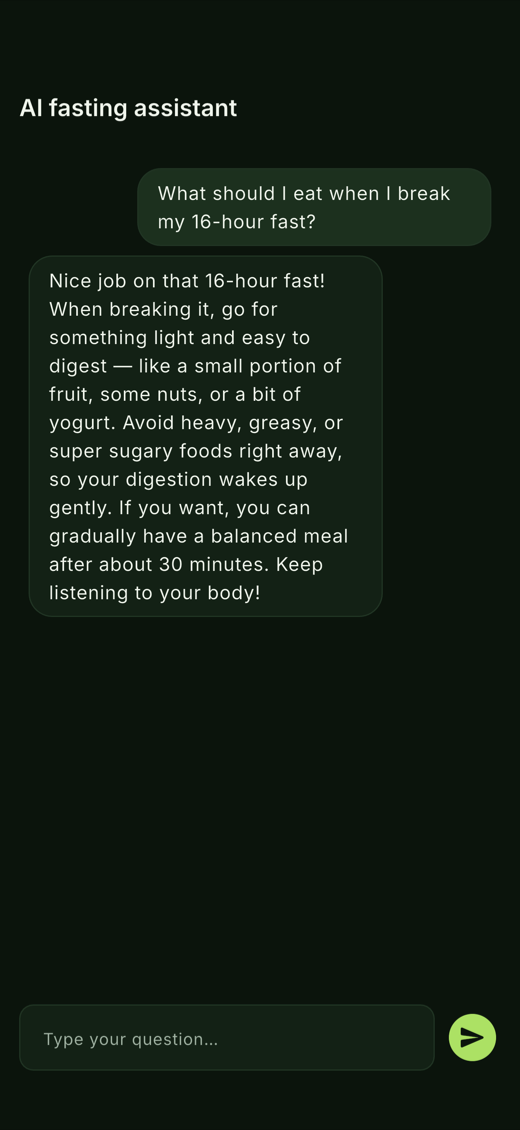
The assistant
The question goes in as you would say it out loud. What comes back is written against your own log — the fast that is running, the streak behind it, today’s score.
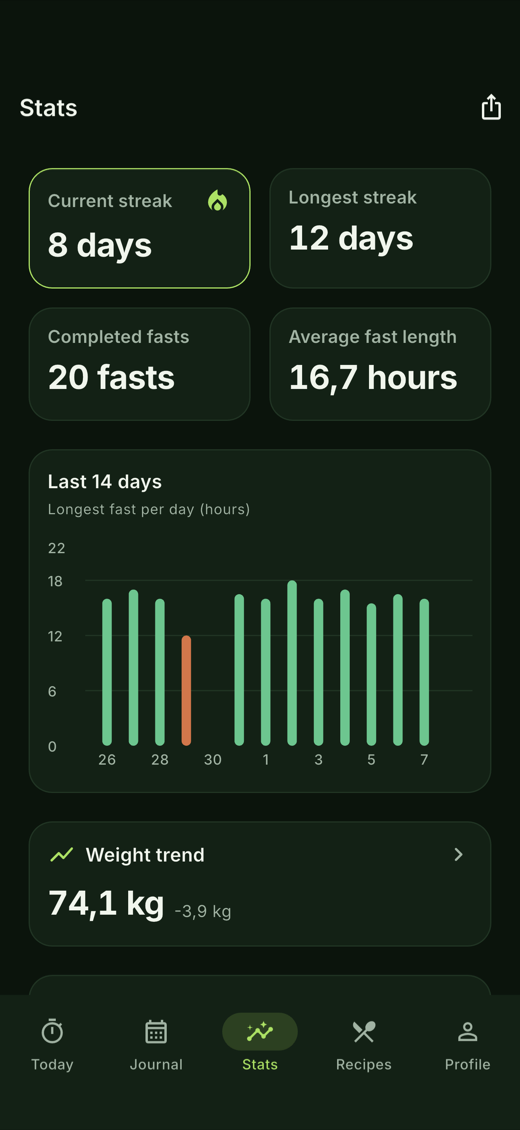
Stats
The streak, the completed fasts, the average length and the last fourteen days, each bar a day. The one in orange is a fast that was broken — it stays on the chart.
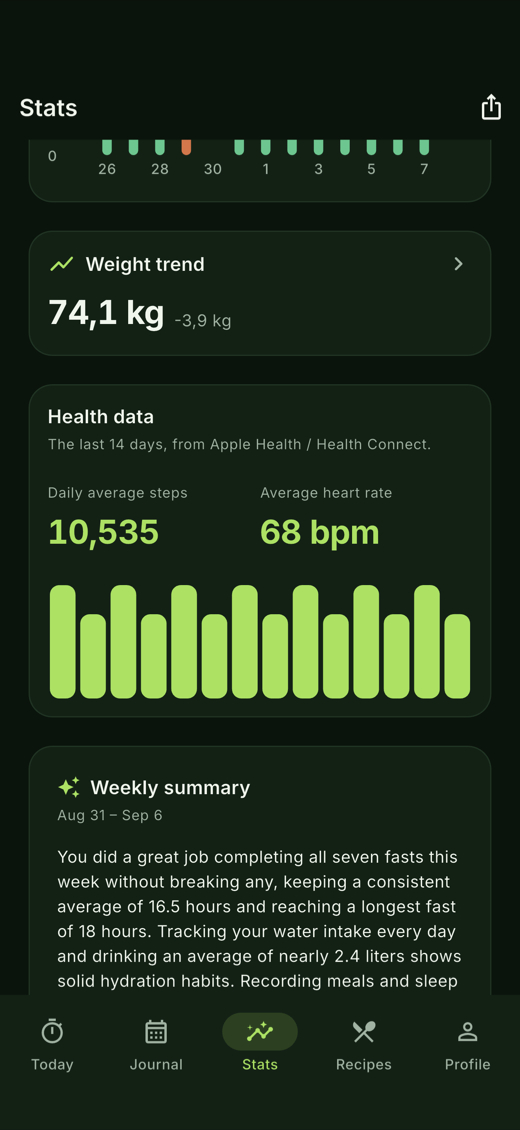
Health data
Connect Apple Health or Health Connect and the day fills itself in. The averages count only the days that actually have data, so a missed sync does not read as a lazy week.
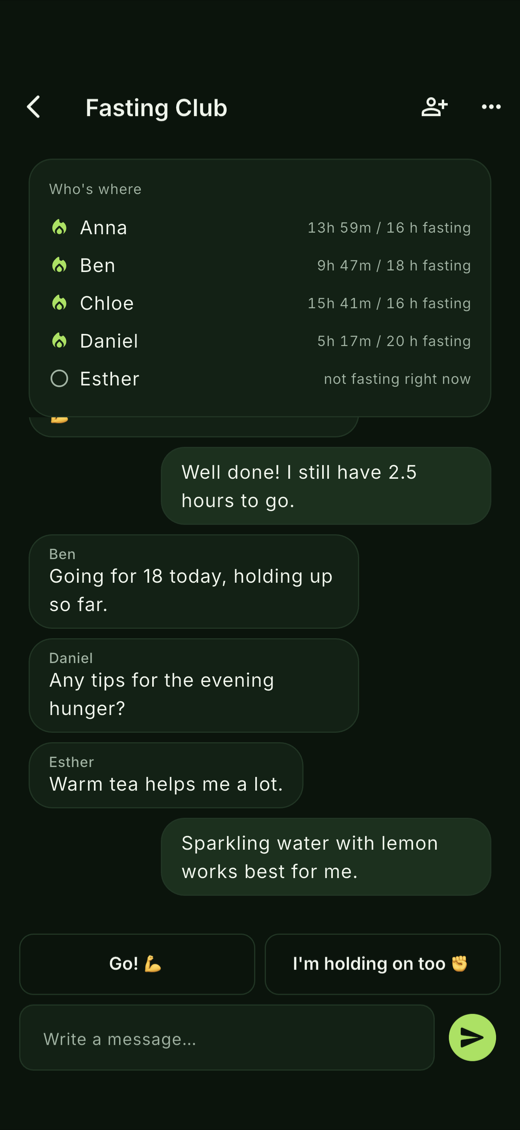
Groups
Everyone’s running fast is visible at the top, live. Below it a conversation that stays between the people in the group — invited by a six-character code, never by link.
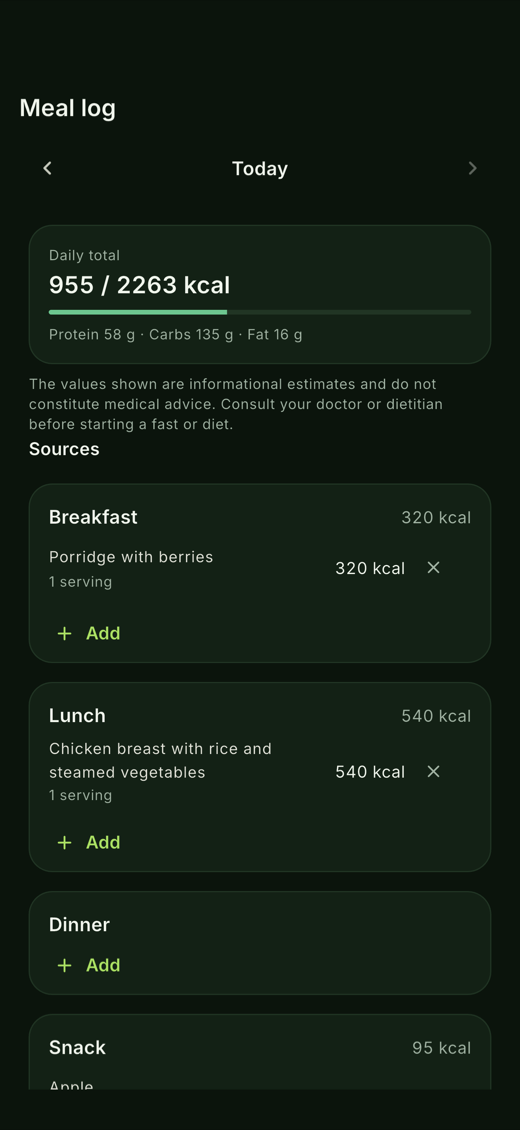
Meal log
Search the database, scan a barcode, photograph the plate, or type it in. The daily target comes from your own profile, and you can override it.
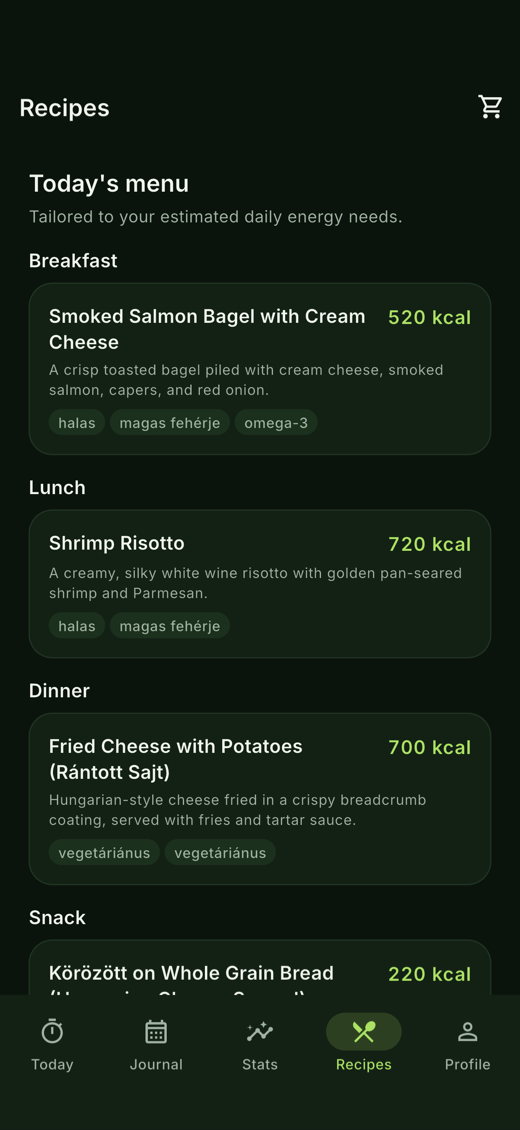
Recipes
Breakfast, lunch, dinner and a snack, sized to your estimated energy need. The same day always gives the same menu — which is the only reason a shopping list is worth having.
Sleep, weight and heart rate count as special category data under the GDPR. That is not a marketing line for us, it is what shapes where the data sits and who can reach it.
Your data lives in European data centres, and is only readable by your own account. Progress photos too.
We do not sell your data and we do not run advertising against it.
No AI feature sends anything until you allow it, and never your name or e-mail. Meal and fridge photos are not stored.
Deleting your account removes your data and your progress photos from the server, from the app.
Daymons is out on iOS and Android. It starts as a guest, with no sign-up — and if you create an account later, everything you logged comes with you.
iOS 15 or newer, and Android.
No. Daymons opens as a guest and the timer starts straight away. Create an account whenever you like and everything you have logged so far moves across with you.
Yes. Elapsed time is calculated on your device from the moment you started, so a flight, a tunnel or an empty data plan changes nothing. The server only syncs; it never drives the clock.
Once a day, not in real time. A phone app cannot run continuously in the background, so the Health Autopilot runs on our server once a day, compares your trends over several days with your own average, and sends at most one notification. Smart reminders and Save My Day are scheduled on your phone in advance and cancel themselves when the goal is met — no connection needed. None of it is a diagnosis.
Hungarian, English and German. The app follows your device language and you can switch it at any time in your profile; your data is the same whichever you pick.
Only what each feature needs, and only after you have given explicit consent. The assistant sees your question and a short summary — the current fast, your streak, today's score. The coach gets today's totals, your goals and your programme. “What should I eat?” gets the photo and what is left of today's budget, and the photo is not stored. Your name and e-mail are never sent. The AI features are premium because every answer has a real cost.
Only you. They are tied to your account and stored in the EU, no other user can reach them, and they are never sent for AI analysis. Delete any photo at any time; deleting your account deletes them all. A photo is shared only if you choose to, and your weight is not on the image by default.
No, and it is built not to. It will not diagnose, will not recommend treatment, and will not suggest a fast over 48 hours or a daily intake under 1200 kcal. If you describe a health complaint, it will tell you to stop and see a doctor.
Yes, if you allow it. Steps, heart rate, sleep and workouts can be read in, so you do not have to log twice. Permission is yours to give and to take back.
There is a delete option inside the app. It removes your account and the data belonging to it, including your progress photos, from the server. You can also export your log before you go.